



Pune o întrebare despre acest produs


Livrare și retururi
Puneți o întrebare – asistentul AI răspunde imediat.


Descriere
The only ergonomic mouse where you can adjust the vertical angle.
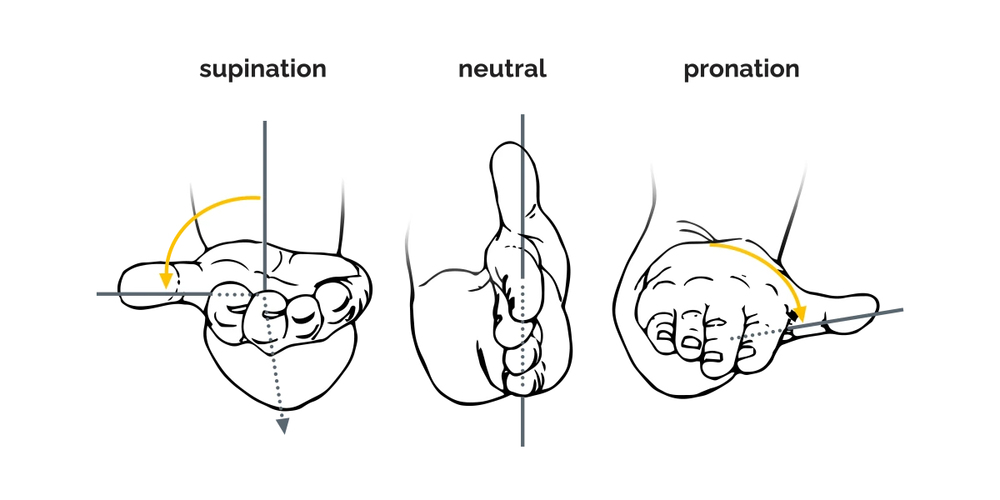
Simply set the tilt angle which best suits you individually by unfolding the mouse level by level, this way of adjustment guarantees that you don’t need time to get used to a vertical mouse.Bring your hand in a neutral position and start working comfortable and healthy. The Oyster Mouse has great features like an extra wide lip to prevent your little finger from rubbing on the desk, six buttons with a clickable scroll-wheel, it is available in two different sizes in wired and wireless, and it can be used alternating with the left and right hand. Whether you are a beginner or a professional in using a vertical mouse user, from now on you will be able to work in a comfortable, relaxed, and neutral hand and wrist position. The vertical grip of the Oyster Mouse prevents physical discomfort, it makes you more productive, and you improve your performance during computer work.
Unique. Adjust the inclination angle.
The Oyster Mouse is a vertical mouse that can be used by people who are already used to a vertical mouse grip, but also for people who never used a vertical mouse before. If you never worked with a vertical mouse before, you can start with a low angle and get used to a vertical grip. After a short time you can improve your hand and wrist posture gradually to a larger vertical angle. Your hand and wrist adapt more and more a neutral, vertical position, and this leads to an ergonomic way of working and physical discomfort can be prevented. If you are used to a vertical mouse grip, you can directly set this mouse on a larger inclination angle. The extra wide lip at the bottom edge prevents in your little finger from rubbing on the surface, which provides even more comfort during your mouse work.
The special function of the Oyster Mouse is, that you can adjust the inclination angle of the mouse in five steps.
Six buttons.
The Oyster Mouse has six buttons inclusive a clickable scroll-wheel. The advantage of a clickable scroll-wheel is, that you can scroll even faster over long pages. In addition to the left and right click buttons, the Oyster Mouse has easy-to-reach thumb buttons for left and right double click. Also, there are two extra buttons for copy and paste. With these smart buttons, you can work as conveniently as possible.
Two sizes, both in wireless and wired.
The Oyster Mouse is available in two different sizes: medium and large. Each size is available in a wired or wireless version. The combination of the correct mouse size for your hand and the ergonomic shape, ensure a relaxed grip and a short time to get used to it.
Ergonomic background
Left and right-hand mouse.


The features.
Nice design.

How to use
Place the Oyster Mouse on a flat surface and select the inclination angle by unfolding the housing into one of the five available tilt positions. Connect the mouse via its wireless receiver or cable depending on the model. Position your hand so it rests naturally on the mouse, with the thumb over the thumb buttons and fingers on the left and right buttons or scroll wheel. If you are new to a vertical grip, begin at a lower tilt and increase the angle gradually as comfort improves.
Recommendations
Start using the Oyster Mouse at a low inclination and increase the tilt step by step over days or weeks to allow your hand and wrist to adapt gradually; pair the correct mouse size (medium or large) with your hand for optimal comfort.
Specificații
Mai multe produse BAKKERELKHUIZEN în această categorie
12
- Mouse BakkerElkhuizen Evoluent 4 Small Wireless, pentru dreapta, design vertical, laser, RF Wireless, 2600 DPI, negru, maro
- BakkerElkhuizen Evoluent 4, pentru dreapta, design vertical, laser, 2600 DPI, negru, gri, argintiu
- BakkerElkhuizen Evoluent 4 Small, pentru dreapta, design vertical, laser, USB Type-A, 2600 DPI, negru, violet
- Mouse BakkerElkhuizen Evoluent 4 Wireless, pentru dreptaci, design vertical, laser, RF Wireless, 2600 DPI, negru, albastru
- BakkerElkhuizen Evoluent 4 Left, pentru stângaci, design vertical, laser, 2600 DPI, Negru, Gri, Argintiu
- Mouse cu fir BakkerElkhuizen Oyster, ambidextru, design vertical, laser, USB Type-A, 1200 DPI, negru, argintiu
- Mouse BakkerElkhuizen DXT 3 wireless, ambidextru, optic, RF Wireless, 2400 DPI, negru
- Mouse BakkerElkhuizen FastForward, pentru mâna dreaptă, design vertical, optic, RF Wireless + Bluetooth + USB Type-C, 500 DPI, gri
- Mouse wireless BakkerElkhuizen DXT 2 Precision, ambidextru, design vertical, laser, RF Wireless + Bluetooth, 2000 DPI, negru, gri
- BakkerElkhuizen ErgoSlider+, ambidextru, laser, 1600 DPI, negru, gri, galben
- BakkerElkhuizen Evoluent 4 Bluetooth negru, pentru dreapta, design vertical, laser, Bluetooth, 2600 DPI, negru
- BakkerElkhuizen Evoluent Standard, pentru dreapta, design vertical, optic, USB Type-A, 1500 DPI, negru, gri, argintiu
Produse populare din această categorie
8
- Mouse Lenovo 4X30M56887 Office ambidextru RF wireless optic 1200 DPI
- Mouse wireless Bluetooth LOGITECH MX Master 3S for Business, grafit
- Mouse Logitech MX Anywhere 3S Business negru wireless
- LOGITECH M330 Silent Plus negru
- Mouse wireless LOGITECH M220 SILENT negru
- Mouse Logitech M350S negru USB optic wireless
- Mouse wireless LOGITECH Signature M650 L - pentru mâini mari - pentru dreptaci - grafit
- Mouse wireless silențios HP 285, ambidextru, optic, RF Wireless, 1200 DPI, negru